Formats
What gets copied, per app if you like, and how to write your own.
A format is how a color is written out: #0d75ee, rgb(13 117 238), Color(red: 0.051, green: 0.459, blue: 0.933). Dabbit ships with about thirty and lets you add your own.
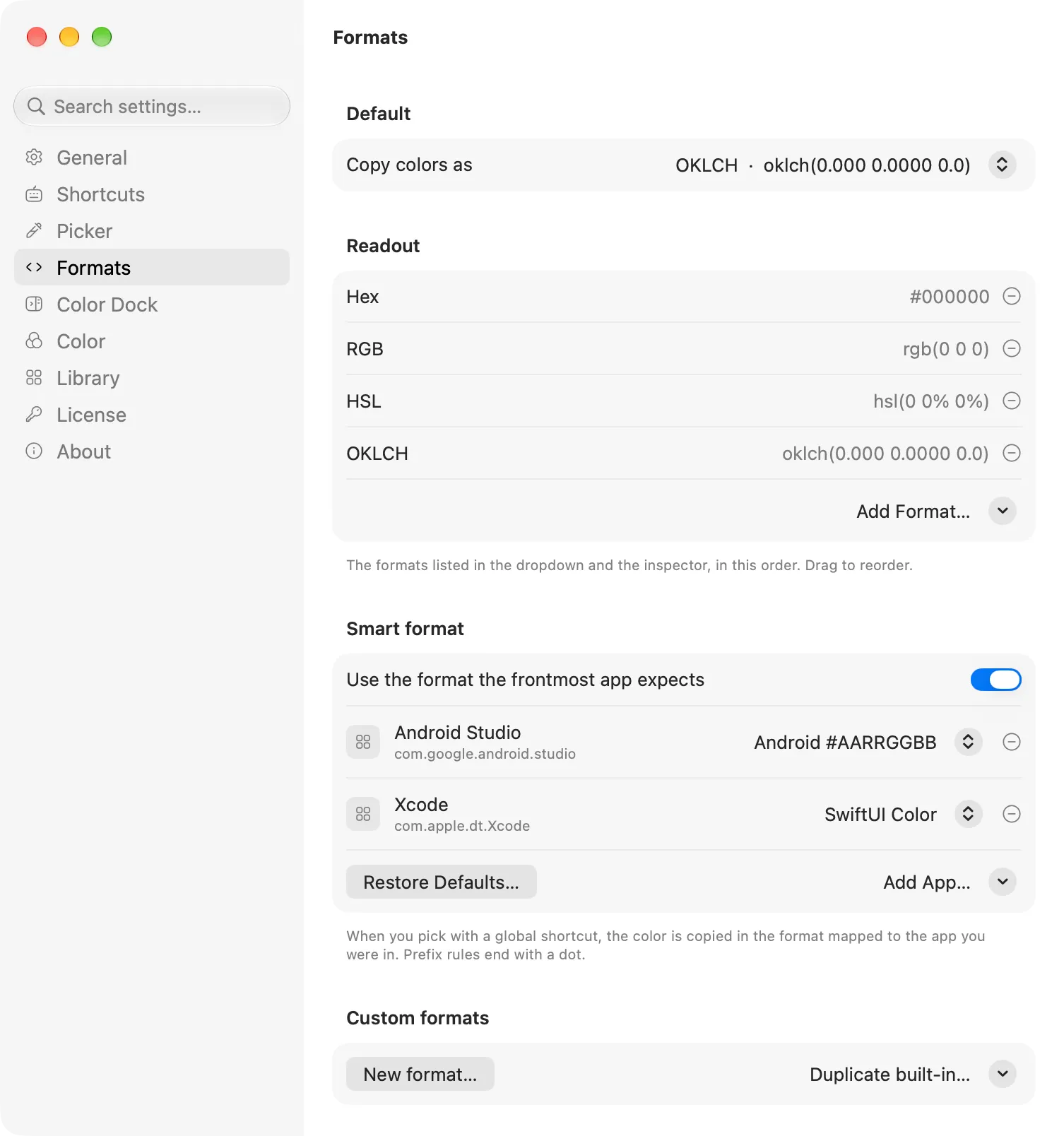
The default format
Copy colors as in Settings → Formats is what every pick copies. Hex, to start. The menu bar mark also has Copy as, for a one-off in any other format without changing the default.
Built-in formats
- Web: Hex, Hex (lowercase), Hex with alpha, Hex (no hash), Hex (Display P3), RGB, RGB (commas), RGBA, HSL, OKLCH, OKLab, Lab, LCH, Display P3, Tailwind arbitrary value, CSS name (the nearest named CSS color)
- Apple: SwiftUI Color, SwiftUI Color (P3), SwiftUI hex literal, UIColor, NSColor, Objective-C UIColor
- Android: Android #AARRGGBB, Color.rgb(), Jetpack Compose
- Other: Flutter, Unity, Godot, Python tuple, RGB floats, RGB 0–255, HSB, CMYK
Readout
The library window and the loupe’s hover card show a color in several formats at once, so you can read the HSL of something without switching your default to HSL. Choose which ones under Readout. The default set is Hex, RGB, HSL and OKLCH.
Smart format
Turn on Use the format the frontmost app expects and Dabbit picks the format by where you are. Two rules come built in: SwiftUI Color in Xcode and #AARRGGBB in Android Studio. Everywhere else your default format applies. Add a rule for any app you have open, change a rule’s format, or remove it; Restore defaults brings the built-in pair back.
Smart format only applies to picks. Copy as, exports and the readout use what you ask for.
Custom formats
New format… (or Duplicate built-in… to start from one) opens the editor. A format is a template with tokens in braces, filled in from the color:
rgba({r}, {g}, {b}, {a:2})        →  rgba(13, 117, 238, 1.00)
Color(hex: 0x{HEX})               →  Color(hex: 0x0D75EE)
--{name}: oklch({ok.l:3} {ok.c:4} {ok.h:1});
The editor lists every token and shows the result live for the current color. The main ones:
| Token | Gives |
|---|---|
{hex} {HEX} {hex8} {HEX8} {argb} {ARGB} |
Hex, lower or upper; with alpha at the end; Android’s alpha-first order |
{r} {g} {b} |
0–255 channels |
{rf} {gf} {bf} |
0–1 channels |
{a} {a255} {apct} |
Alpha as 0–1, 0–255, or percent |
{h} {s} {l} |
HSL, degrees and percent |
{hsb.h} {hsb.s} {hsb.b} |
HSB |
{ok.l} {ok.c} {ok.h} {ok.a} {ok.b} |
OKLCH / OKLab |
{lab.l} {lab.a} {lab.b} {lch.l} {lch.c} {lch.h} |
CIE Lab / LCH |
{p3.r} {p3.g} {p3.b} |
Display P3 channels, 0–1 |
{p3.hex} {P3.HEX} |
rrggbb of the Display P3 channels: the hex a Figma file set to Display P3 shows |
{c} {m} {y} {k} |
CMYK |
{lum} |
Relative luminance |
{name} |
The nearest named CSS color (rebeccapurple) |
Add :N to any numeric token for N decimals: {rf:3}, {ok.c:4}. Whole numbers otherwise.
Custom formats appear everywhere built-in ones do: the default picker, Copy as, the readout, Smart format rules, and the format= parameter of the URL scheme. They’re included in backups.